
Toyota Yaris: Warning/Indicator Lights and Warning Sounds / Message Indicated on Display
Toyota Yaris XP210 (2020-2026) Owner's Manual / If Trouble Arises / Warning/Indicator Lights and Warning Sounds / Message Indicated on Display
If a message is displayed in the center display, take appropriate action (in a calm manner) according to the displayed message.
Display example

 Taking Action
Take the appropriate action and verify that the warning light turns off.
KEY Warning Light
Take the appropriate action and verify that the warning light turns
off...
 Stop Vehicle in Safe Place Immediately
If the following messages are displayed in the center display, a vehicle
system may be malfunctioning. Stop the vehicle in a safe place and
contact your Toyota dealer...
Other information:
Toyota Yaris XP210 (2020-2026) Owner's Manual: Displayable Range on the Screen
The images on the screen may be different from the actual conditions. Screen display Actual view The displayable range varies depending on the vehicle and road conditions. The displayable range is limited. Objects under the bumper or around the bumper ends cannot be displayed...
Toyota Yaris XP210 (2020-2026) Owner's Manual: Audio Control Switch Operation
Adjusting the Volume To increase the volume, press up the volume switch ( + ). To decrease the volume, press down the volume switch ( ̶ ). Seek Switch AM/FM radio Press the seek switch ( , ). The radio switches to the next/previous stored station in the order that it was stored...
Categories
- Manuals Home
- Toyota Yaris Owners Manual
- Toyota Yaris Service Manual
- Maintenance
- Opening and Closing the Liftgate/Trunk Lid
- Diagnostic Trouble Code Chart
- New on site
- Most important about car
Refueling
Before refueling, close all the doors, windows, and the liftgate/trunk lid, and switch the ignition OFF.
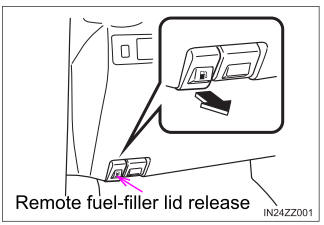
To open the fuel-filler lid, pull the remote fuel-filler lid release.

Copyright © 2026 www.toyaris4.com